

Customer view

The Customer view is your command center for individual customer management. It brings together all the essential information about a customer in one place, giving you a complete picture of their journey, engagement, and value to your business.
With this 360-degree view, you can make informed decisions about how to best serve each customer, identify opportunities for growth, and address potential issues before they impact your relationship.
Key information at a glance
The profile header gives you immediate access to important customer metrics:
Lifetime value: See the total revenue generated by this customer over time
Average spend: Understand their typical monthly contribution to your business
First seen: Know when this customer initially engaged with your app
Last active: Track when they most recently interacted with your platform
Churn risk: Quickly identify customers who might be at risk of leaving
This snapshot helps you quickly assess the customer’s health and prioritize your attention accordingly.
Current status indicators
Stay updated on essential customer information:
Current plan: See which plan the customer is subscribed to, with pricing details
Current invoice: Track active billing periods and access invoice details
Affiliates: View affiliate relationships and manage connections
Tags: Apply custom tags to organize customers by specific criteria
These indicators give you immediate context for customer interactions and decision-making.
Understanding customer statuses
Mantle categorizes your customers based on their current status, which helps you understand where they are in their journey:
Installed: Customers who have the app installed without an active subscription
Subscribed: Customers with an installed app who’ve selected and authorized a plan
Uninstalled: Customers who’ve removed the app
Lead: Prospects who haven’t installed the app but have shown interest
Cancelled: Customers who still have the app installed but cancelled their subscription
Lost: Customers who uninstalled the app and cancelled their subscription
These statuses help you identify opportunities for engagement, upselling, or re-engagement campaigns.
Usage metrics
Understand how customers engage with your app through visual metrics:
Key performance indicators: Track metrics specific to your app
Usage trends: View graphical representations of usage patterns over time
Transaction data: See purchase history and order information
These insights help you identify power users, spot engagement issues, and tailor your communication based on actual usage patterns.
Custom fields
Extend your customer data with information that matters to your business:
App custom fields: Store app-specific data points to enhance customer profiles
Customer custom fields: Add cross-app information that provides additional context
Email variables: Manage personalization tokens for email communications
Custom fields make your customer profiles truly your own, allowing you to capture and track the data most relevant to your business model.
Usage and billing history
Keep track of all financial transactions with comprehensive billing data:
One-time charges: View non-recurring purchases
Subscription changes: Track plan upgrades, downgrades, and pricing adjustments
Billing issues: Identify and address payment problems quickly
This financial timeline helps you understand the customer’s investment in your product over time.
Customer timeline
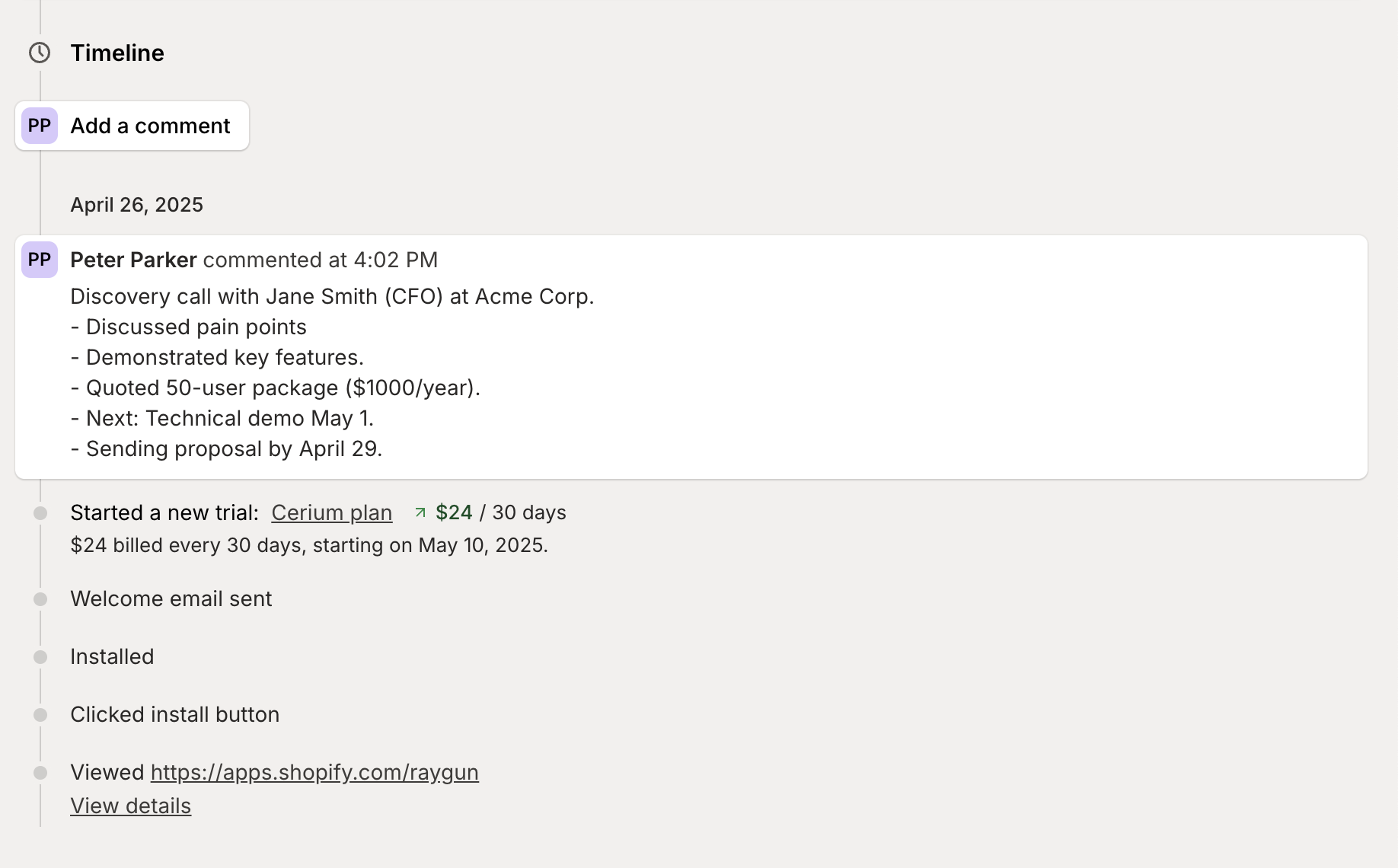
The timeline provides a chronological view of every significant customer interaction:
Plan changes: Track when customers upgrade, downgrade, or modify their subscription
Communication history: See all emails sent to the customer
App events: View important milestones and interactions
Installation/uninstallation events: Know exactly when customers installed or removed your app
Add your own comments to document important conversations or decisions for a complete interaction history.
Customer contacts & account details
Access important contact information and account details:
Customer info: View contact details and account ownership
Contacts and account owners: See all team members associated with this customer
This visibility ensures everyone on your team has the context they need when interacting with the customer.
This comprehensive view transforms how you understand and interact with your customers, helping you build stronger relationships and drive growth through personalized engagement.
Taking action
The customer profile gives you multiple ways to engage with customers directly:
Add a comment: Document important notes for team visibility
Custom actions: Connect Mantle to your custom internal tools with dynamic customer variables
View invoice: Review and manage billing details
Manage affiliates: Adjust affiliate relationships and settings
Custom actions for specialized tools
Mantle provides most of the tools you need for customer management right out of the box. Custom actions extend this functionality by creating bridges to specialized systems:
Connect to your proprietary tools: Link directly to internal dashboards or custom applications you’ve built specifically for your business
Access development environments: Create shortcuts to test or staging versions of your app for this specific customer
Include dynamic variables: Automatically pass customer ID, email, shop domain, or Shopify ID to your tools
Maintain context: Access specialized information without leaving the customer profile
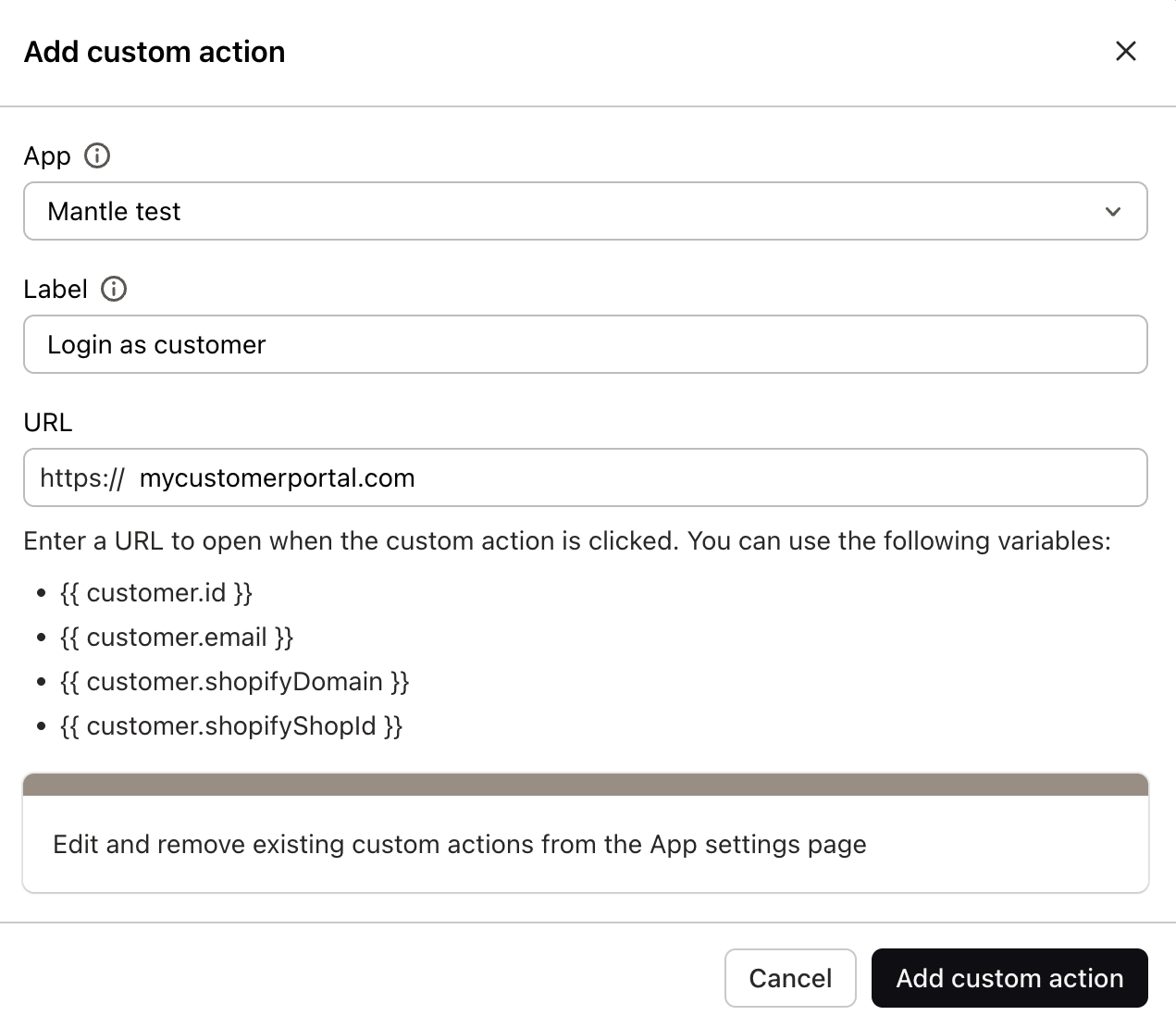
For example, while Mantle handles most customer needs directly, you might create custom actions to:
Access proprietary admin panels you’ve developed for your specific business requirements
Launch customer-specific testing or debugging environments
Open custom reporting dashboards built for your unique business metrics
Connect to specialized industry-specific tools that complement Mantle’s capabilities
Each custom action appears as a convenient button in the customer interface, creating a seamless experience that makes Mantle the central hub for all your customer operations—while still allowing access to your specialized internal tools when needed.