Bundle Launch Playbook: From Setup to Revenue
You've configured your bundle in Mantle—now what? This playbook walks you through the full launch strategy: how to promote your bundle, where to place it, what to say, and how to measure success.
Prerequisites: This guide assumes you've already created your bundle in Mantle. If you haven't, start there first. For strategic considerations on which apps to bundle, see our Strategic Bundling guide.
The Launch Timeline
A successful bundle launch isn't a single announcement—it's a coordinated campaign. Here's a proven 4-week timeline:
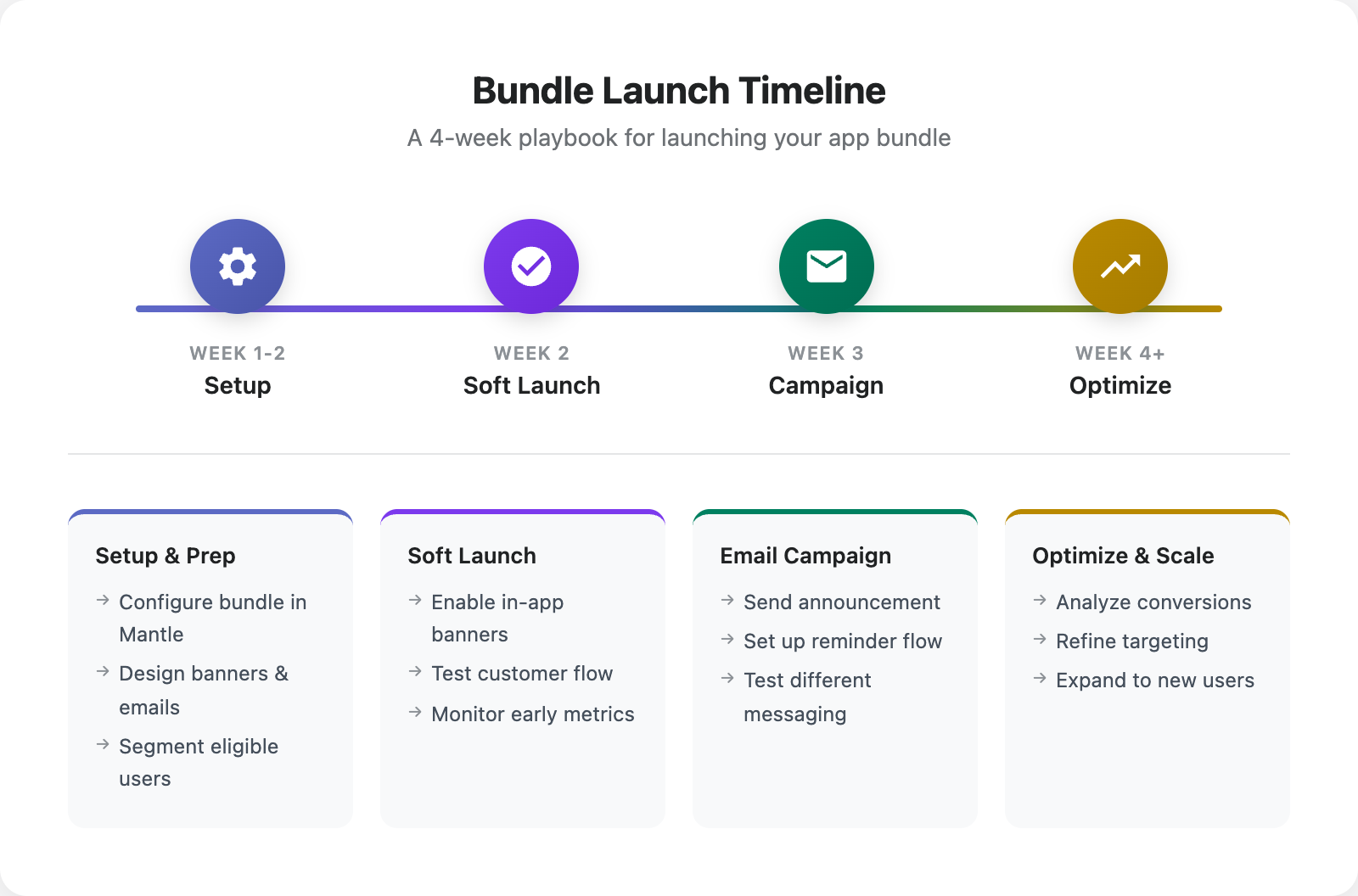
Week 1-2: Setup & Preparation
Configure bundle in Mantle — Set your discount percentage, select apps, and test that discounts apply correctly
Design promotional assets — Create banners, email templates, and app listing copy
Segment eligible customers — Identify customers using one app who would benefit from the other
Week 2: Soft Launch
Enable in-app banners — Start with subtle promotion to existing users
Test the customer flow — Verify the bundle discount applies to subscriptions
Monitor early adoption — Track click-through rates and conversions
Week 3: Email Campaign
Launch announcement email — Send to all eligible customers
Set up reminder flow — Follow-up for those who didn't click through
Test different messaging — Try different subject lines and CTAs across sends
Week 4+: Optimize & Scale
Analyze conversion data — Which segments convert best?
Refine targeting — Focus on high-intent segments
Expand to new customers — Promote bundles at signup
In-App Promotion Strategies
The most effective bundle promotion happens where customers already are—inside your apps. Here are four banner styles that work:
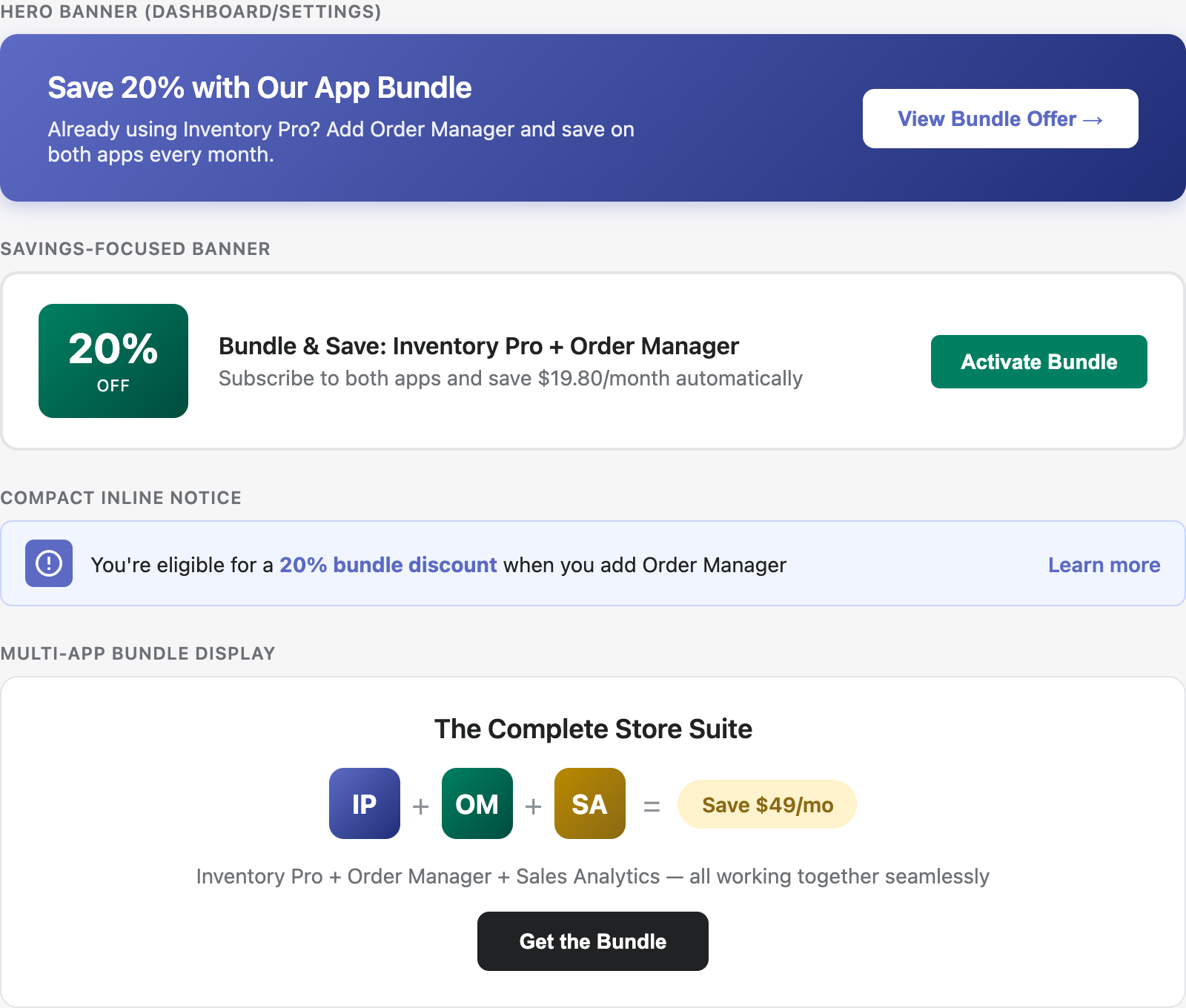
1. Hero Banner (Dashboard/Settings)
Best for: App dashboards, settings pages, or anywhere with visual space
The gradient hero banner makes a bold statement. Use it for:
First-time visitors to your app
Dashboard pages where users spend time
Settings or account pages
Key elements:
Strong headline ("Save 20% with Our App Bundle")
Brief value prop
Clear CTA button
2. Savings-Focused Banner
Best for: Billing pages, plan selection screens
Lead with the discount when users are already thinking about money:
Show the percentage prominently
Include specific dollar savings
Perfect for upgrade flows
3. Compact Inline Notice
Best for: Feature pages, sidebars, contextual placement
When you want to mention the bundle without dominating the page:
Subtle but noticeable
Works inline with other content
"Learn more" link for interested users
4. Multi-App Bundle Display
Best for: Landing pages, onboarding flows
When promoting a suite of 3+ apps:
Show all app icons together
Emphasize the "complete solution" angle
Calculate total savings
Where to Place Banners
High-Impact Placements
Location | Why It Works | Banner Style |
|---|---|---|
App Dashboard | Users see it daily | Hero or Savings |
Settings/Billing | Money-minded context | Savings-focused |
Feature using bundled app | Contextual relevance | Inline notice |
Onboarding flow | Capture early intent | Multi-app |
Success moments | Positive association | Any style |
Timing Matters
Don't show bundle banners to everyone all the time. Target based on:
Usage signals: Show after they've used your app 3+ times
Time on plan: Wait until they've been subscribed for 2+ weeks
Feature usage: Trigger when they use a feature that would work better with the bundled app
Billing events: Show before renewal when they're thinking about value
Email Campaign Templates
Email remains one of the most effective channels for bundle promotion. Here's a template that converts:
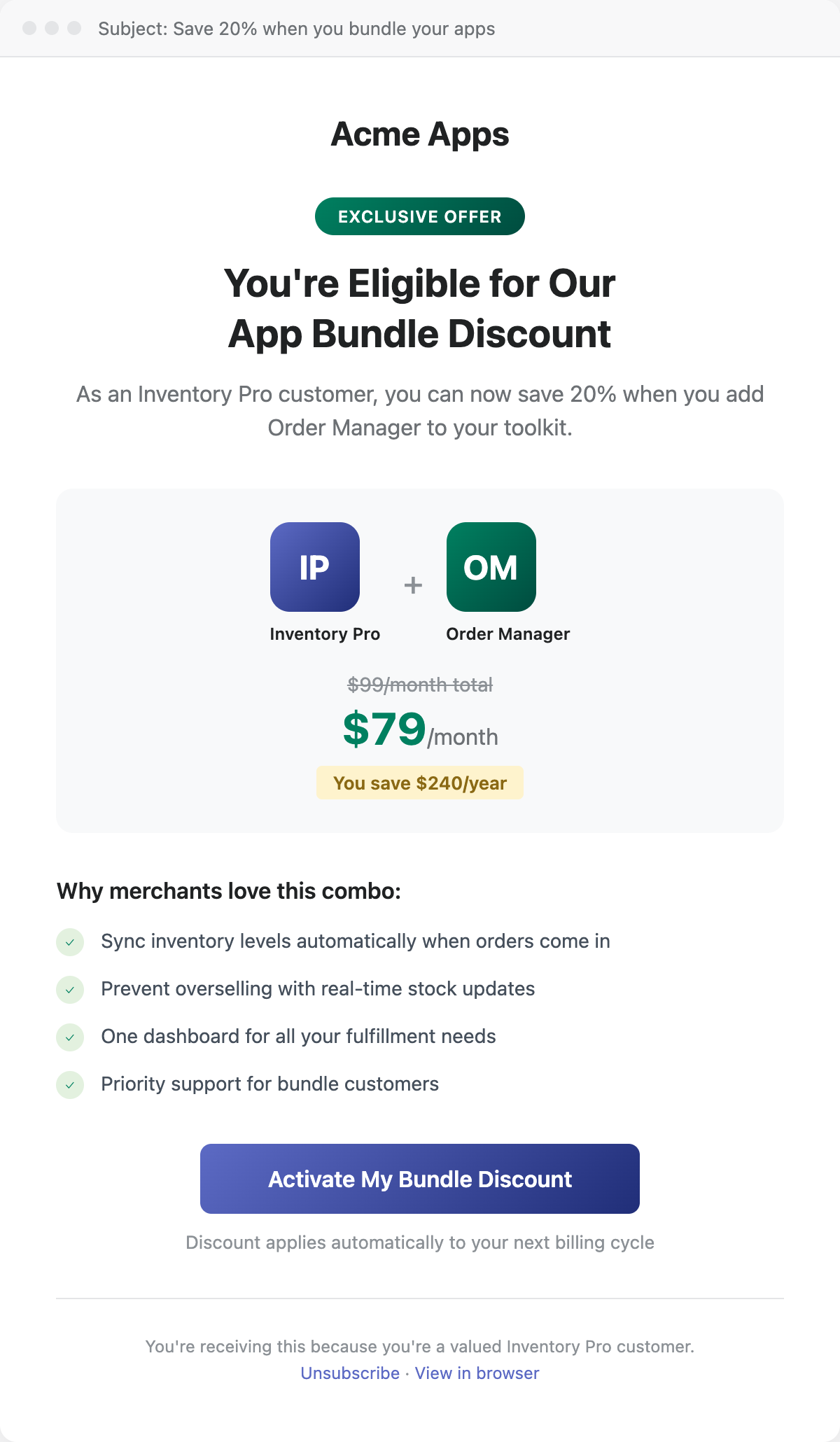
Email Anatomy
Subject Line: Lead with savings or exclusivity
"Save 20% when you bundle your apps"
"You're eligible for our App Bundle discount"
"Inventory Pro + Order Manager = 20% off"
Hero Section: Clear headline and brief context
Personalize: "As an Inventory Pro customer..."
Specific benefit: "Save $240/year"
Bundle Visual: Show the apps together
App icons side by side
Original vs. discounted price
Total savings highlighted
Benefits List: Why it's better together
Sync features between apps
Unified dashboard
Priority support
CTA: Single, clear action
"Activate My Bundle Discount"
"Get the Bundle"
"Start Saving Today"
Email Sequence
Don't send just one email. Build a sequence:
Day | Goal | |
|---|---|---|
1 | Announcement | Introduce the offer |
4 | Reminder | Re-engage those who didn't click |
7 | Use Case | Show specific value |
14 | Last Chance | Create urgency (if time-limited) |
Using Mantle Flows for Email
Set up automated bundle emails in Mantle Flows. Use a segment to target customers who are subscribed to one app, then:
Trigger: Customer enters segment (single-app subscribers)
Action: Send bundle announcement email
Wait: 4 days
Condition: Hasn't clicked the email link
Action: Send reminder email
App Store Listing Optimization
Your Shopify App Store listing is another touchpoint. You can't add custom banners to the listing, but you can mention your bundle in two ways:
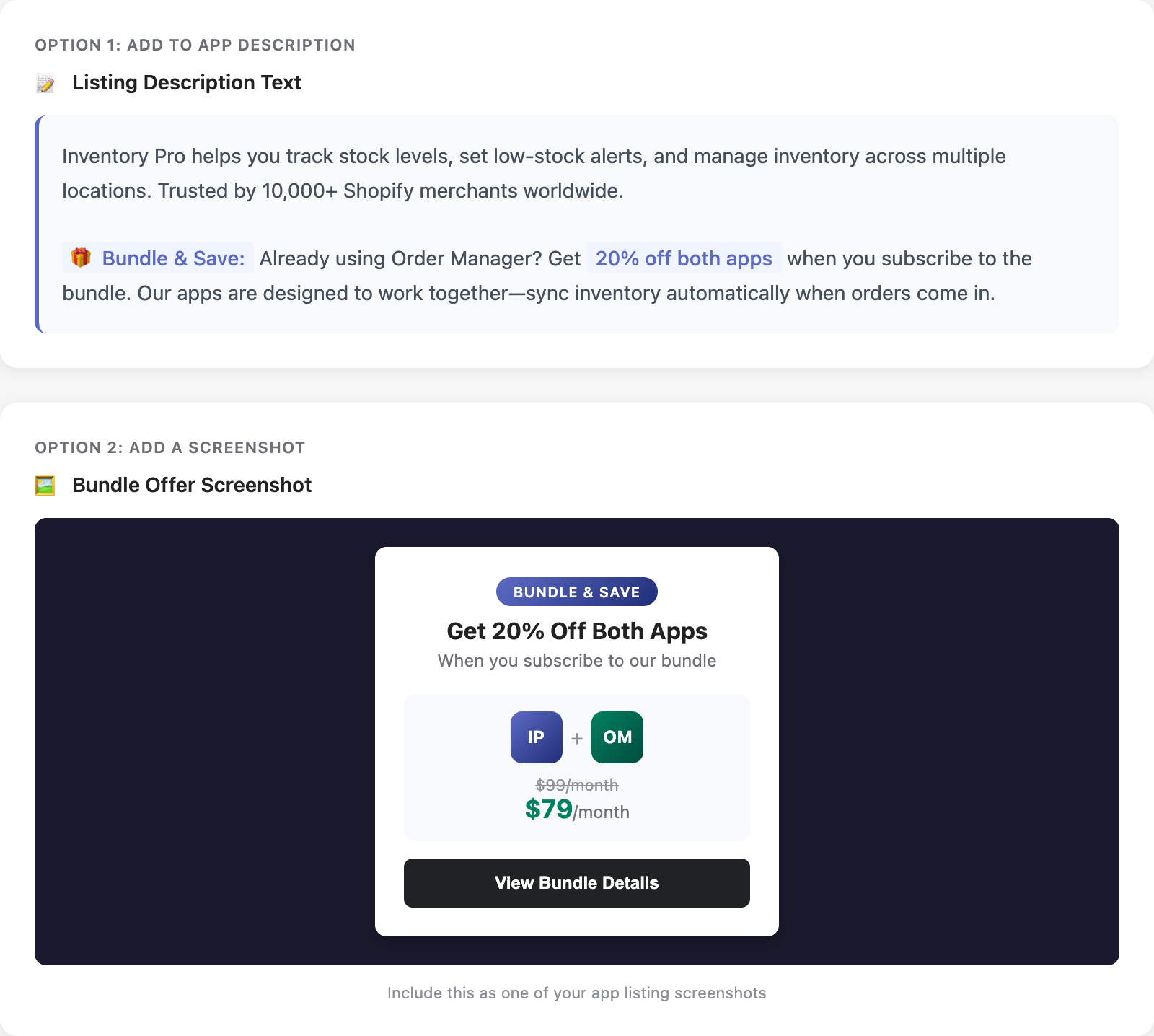
Option 1: Add to Your Description
Include a bundle callout in your app description:
"🎁 Bundle & Save: Already using Order Manager? Get 20% off both apps when you subscribe to the bundle. Our apps are designed to work together—sync inventory automatically when orders come in."
Option 2: Add a Screenshot
Create a dedicated screenshot showing your bundle offer:
Show both app icons together
Highlight the discount percentage
Include the bundled price
Add a clear call-to-action
This screenshot can be included in your listing's screenshot carousel.
Other Places to Mention Bundles
FAQ Section: "Do you offer discounts for multiple apps?"
Demo Video: Mention the bundle at the end
Cross-link: Link to your other apps in the description
Common Mistakes to Avoid
❌ Promoting Too Early
Don't show bundle offers to brand new users. Wait until they've experienced value from their first app.
❌ Discount Too Deep
A 50% bundle discount sounds great but may devalue your apps. 15-25% is the sweet spot.
❌ No Urgency
"Save 20% forever" is less compelling than "Save 20% this month." Consider time-limited launch offers.
❌ Ignoring Non-Converters
Someone who clicked but didn't convert is interested. Follow up with targeted content.
❌ One-Size-Fits-All Messaging
Different customer segments respond to different pitches. Test and personalize.
Quick Start Checklist
Ready to launch? Here's your checklist:
Bundle configured in Mantle with correct discount
In-app banners designed and placed
Email campaign written and scheduled
Flows set up for automated outreach
App listing updated with bundle mention
Team aligned on launch date and sequence
Related Resources
Bundle discounts — How to configure bundles in Mantle
Strategic Bundling — Deciding which apps to bundle
Creating your first flow — Set up automated bundle campaigns
Email variables guide — Personalize your bundle emails