

Abandoned subscription recovery flows
You know that feeling when someone’s about to subscribe to your app but then… nothing? They just disappear? Those are abandoned subscriptions, and they’re pure gold if you handle them right.
Here’s the thing - these customers already showed serious interest. They went to your subscription page, maybe even started the process. Something just got in the way. With the right follow-up flow, you can often get them back.
We’ll show you two ways to build these recovery flows:
Quick setup - Use Shopify’s abandoned charge detection (fires within 48 hours)
Advanced method - Custom triggers for faster response times and more control
Why this matters
When someone visits your subscription page but doesn’t complete the purchase, that’s your moment. The right recovery flow can:
Remind them of the value they were considering
Address whatever concerns stopped them
Offer incentives to complete their subscription
Provide extra help or information
Track how well your recovery efforts work
Both methods work great, but they have different timing and complexity trade-offs.
Quick setup method
This uses Shopify’s built-in abandoned charge detection - super easy to set up, and perfect if you want to get recovery flows running quickly.
How it works: Shopify automatically detects when a customer:
Visits your subscription page in their admin
Leaves without completing the subscription
Has an abandoned charge authorization
The trigger fires within 48 hours (usually much faster).
When to use this:
You want to get started quickly with minimal setup
48-hour response time works for your business
You’re okay with Shopify handling the detection logic
Let’s build it:
Step 1: Create your flow Head to Flows and click Add flow. Name it something like “Abandoned Subscription Recovery”.
Step 2: Set up the trigger
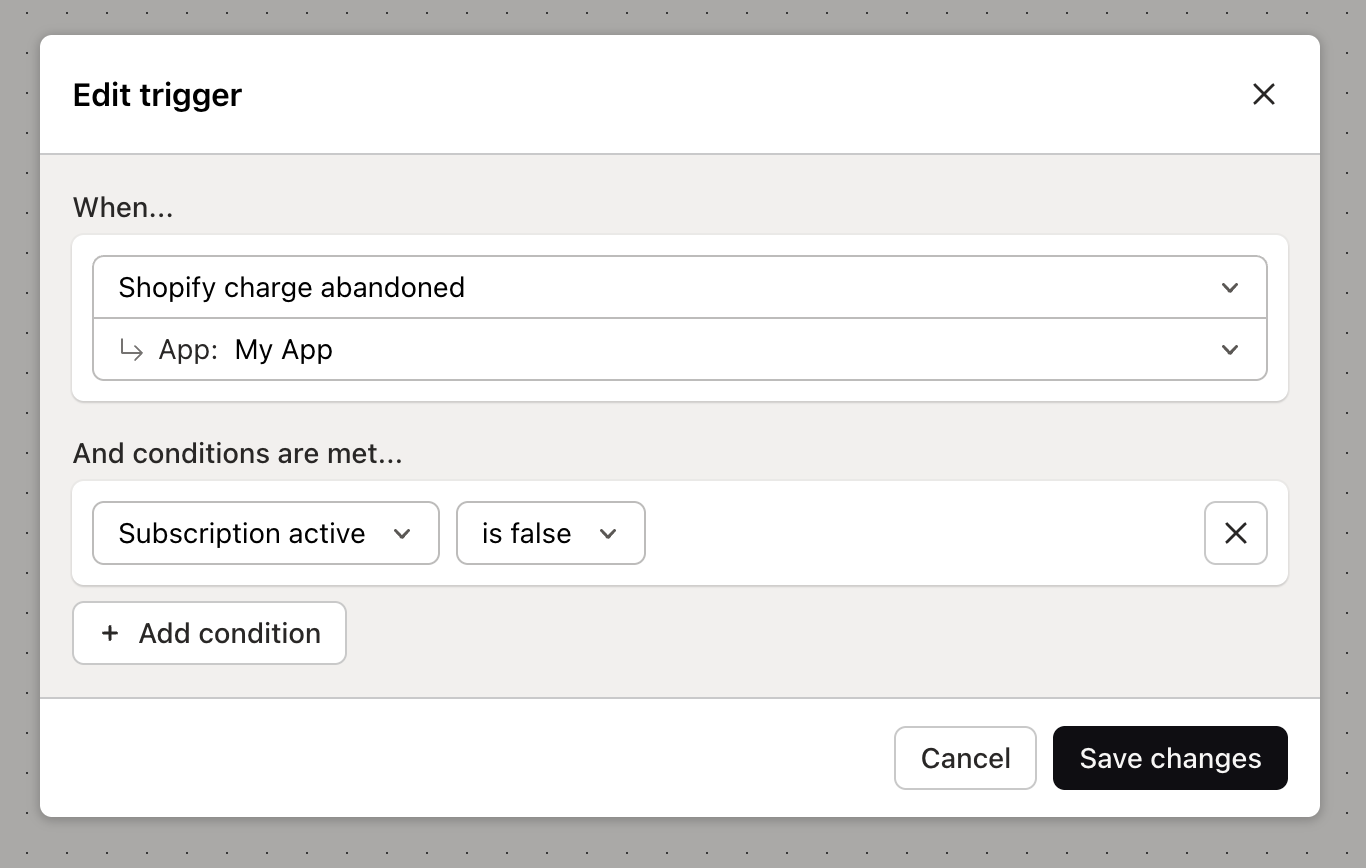
Set your trigger to Shopify abandoned charge event. That’s it - Shopify will automatically detect abandoned subscriptions for you.
Step 3: Add your recovery actions
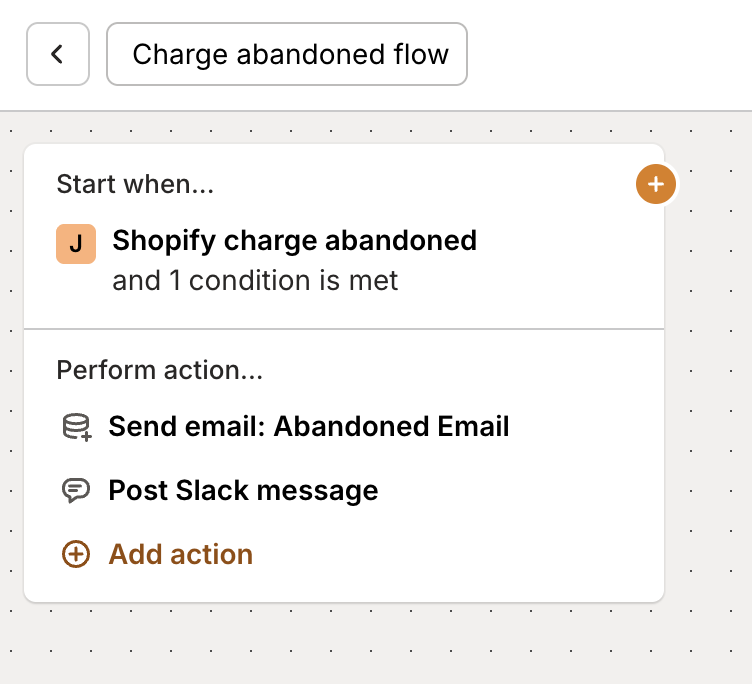
Now for the good stuff. When someone abandons their subscription, your flow can:
Send a recovery email - Remind them what they were about to get
Apply a discount tag - Offer an incentive to come back
Update custom fields - Track recovery attempts
Notify your team - Alert someone to follow up personally
Your complete flow:
Advanced method
Want faster response times and more control? This method uses custom triggers so you can respond immediately when someone shows subscription interest but doesn’t follow through.
How it works: Instead of waiting for Shopify’s detection, you trigger recovery flows based on:
Custom usage events you define
Page view tracking on your subscription page
Specific user actions or behaviors
When to use this:
You need faster response than 48 hours
You want more control over trigger conditions
You’re using Mantle Hosted Billing with page view tracking
You have specific usage patterns to monitor
Let’s build it:
Step 1: Create your flow Create a new flow - something like “Fast Abandoned Subscription Recovery”.
Step 2: Set up custom triggers
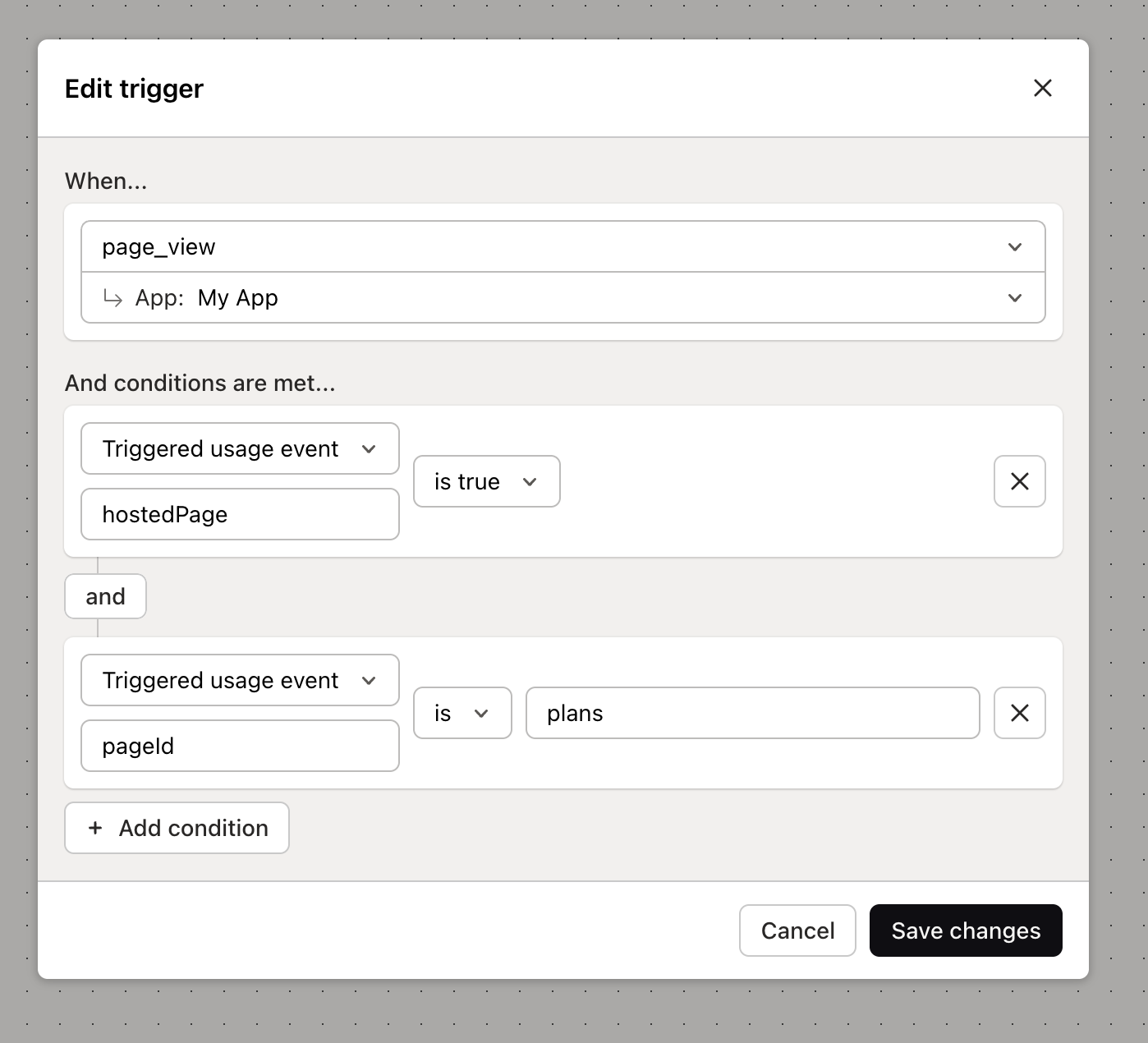
You’ve got two main options here:
Option A: Page view tracking If you’re using Mantle Hosted Billing, you can trigger on page views to your subscription page:
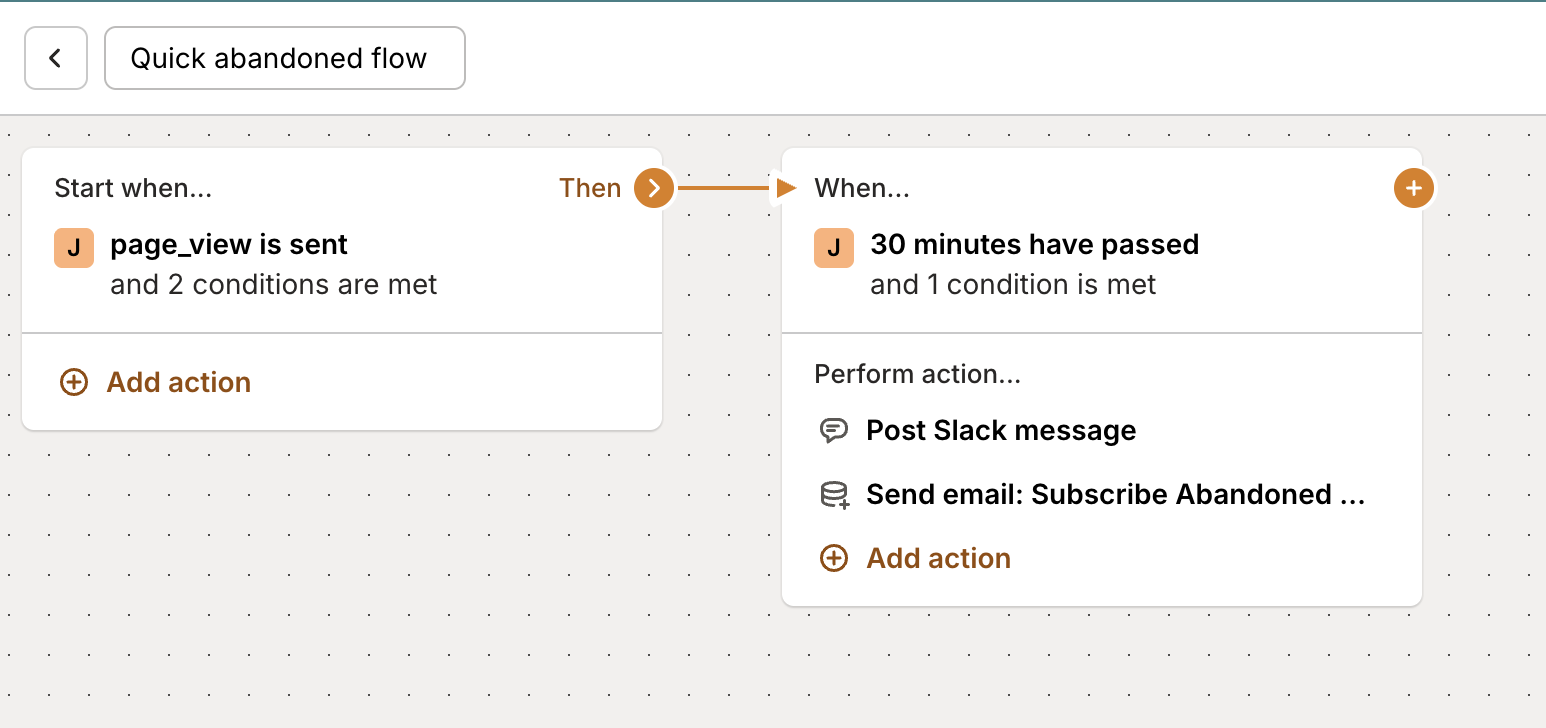
Set trigger to Usage event occurs
Select Page view as the event type
Target your plans/subscription page
Add conditions for time spent or specific actions
Option B: Custom events Create custom events that fire when customers show interest but don’t convert:
“Viewed pricing” without subscribing
“Started subscription” without completing
“Selected plan” without purchasing
“Clicked subscribe” without following through
Step 3: Add your recovery actions
Wait a bit (maybe 2 hours instead of 48), then add your recovery actions:
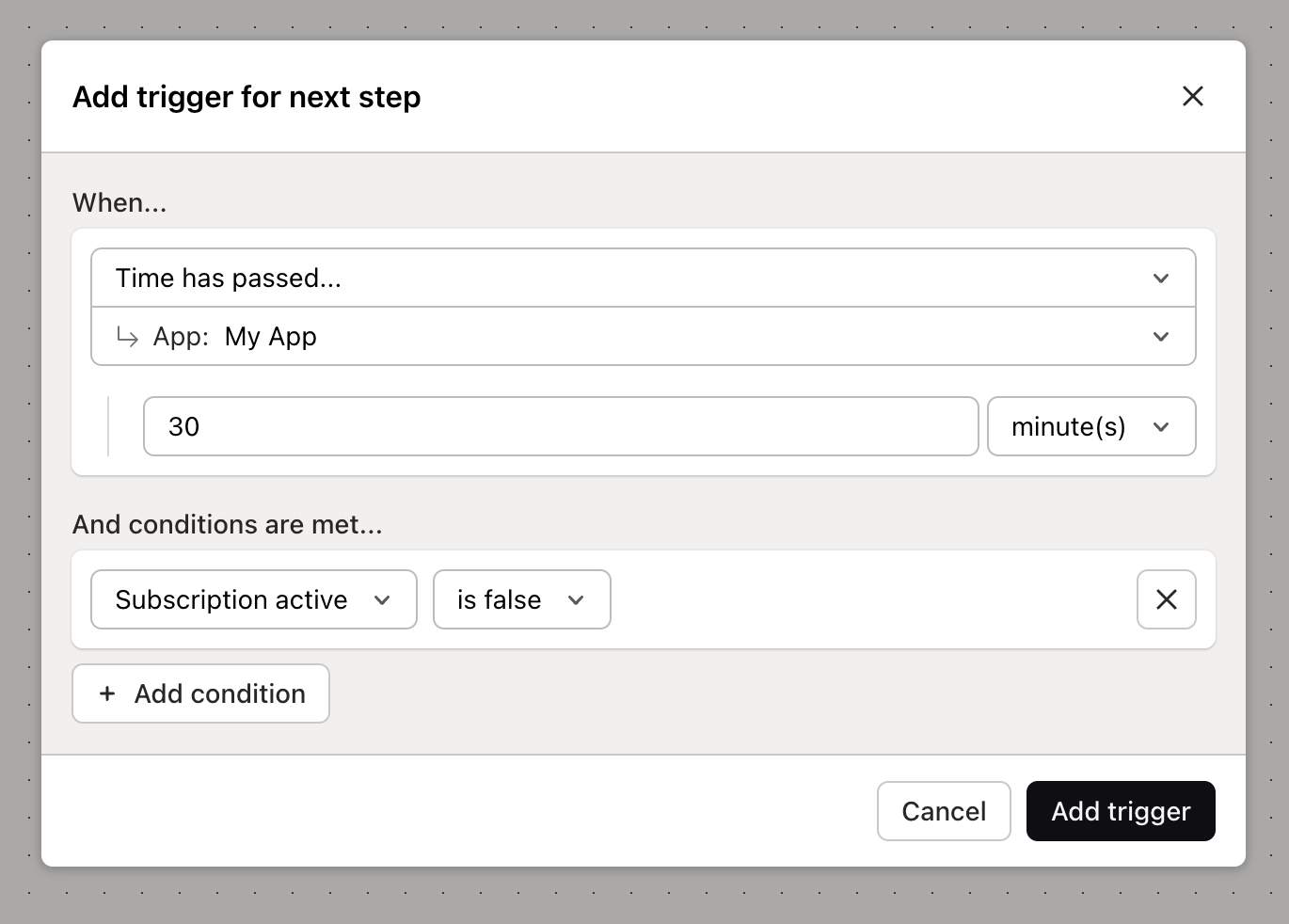
Your complete advanced flow:
Tips for better recovery
Whichever method you choose, here are some tips to make your recovery flows more effective:
Timing matters
Don’t be too pushy - wait at least a couple hours before reaching out
Test different timing intervals to see what works for your audience
Consider time zones when scheduling recovery emails
Make it helpful, not salesy
Focus on solving their problem, not just getting the sale
Address common concerns or obstacles in your recovery emails
Offer genuine value, like helpful tips or resources
Test different approaches
Try different discount amounts to see what motivates action
A/B test your recovery email subject lines and content
Track which recovery actions work best for your customers
Know when to stop
Don’t keep emailing forever - 2-3 attempts is usually enough
Respect unsubscribe requests immediately
Consider different messaging for repeat abandoners
Which method to choose?
Start simple: Use the Shopify method if you’re new to recovery flows
Go advanced: Use custom triggers if you need faster response times
Use both: Combine approaches for maximum coverage
Remember - these customers already showed interest. Your job is to remove whatever obstacle stopped them, not to convince them they need your product. Keep it helpful, keep it genuine, and you’ll see great results.
Ready to build more customer engagement flows? Check out our complete flow creation guide.