

Billing cycles
Ever wonder why there’s such a big gap between when you bill your customers and when you actually see the money? You’re not alone. The Billing Cycles report helps you understand exactly when your charges turn into actual revenue - and why those timelines can vary so dramatically across your customer base.
What makes this report different
While most financial reports focus on how much money you’re making, Billing Cycles shows you something equally important: when you’ll actually get paid. It’s the difference between “Customer A owes me $50” and “Customer A will pay that $50 in exactly 17 days.” This timing insight is crucial for everything from cash flow planning to customer support conversations.
Report components
Your payment timeline at a glance
Right at the top, you’ll see your “Typical days until paid” - the average time between billing and payment across your entire customer base. This number is gold for financial planning, but don’t let it fool you. As you’ll see in the visualization below, individual customers can vary widely around this average.
The timeline visualization
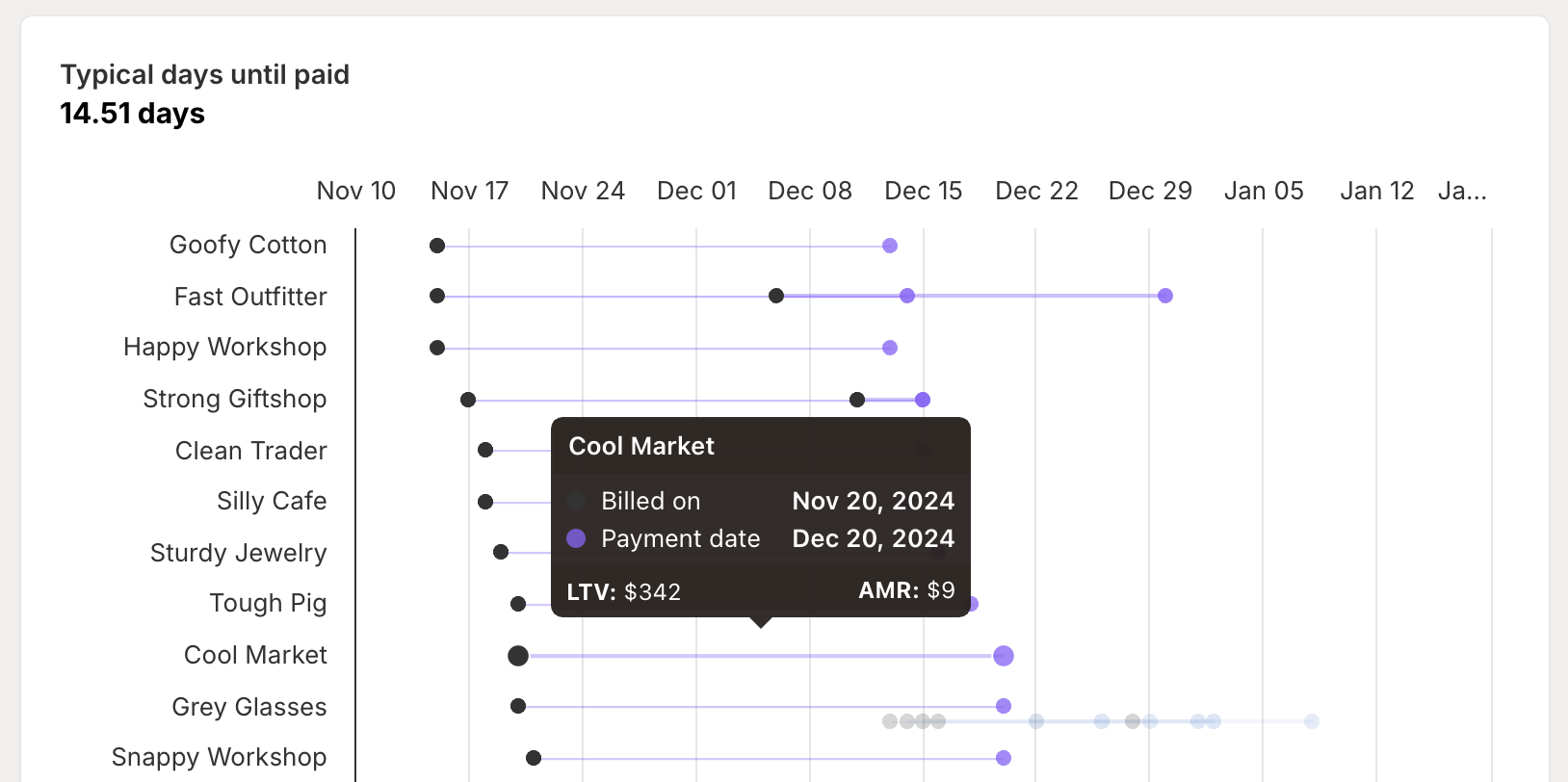
The heart of the report is a detailed view of every customer’s billing pattern:
The left dot shows when you create a charge through the Shopify Billing API
The blue line represents the waiting period (your accounts receivable)
The right dot indicates when the merchant actually pays through their Shopify billing cycle
This visualization often creates an “aha moment” for app partners - it’s the first time they can actually see how billing cycles interact across their entire customer base. Those varying blue lines tell a powerful story about the complexity of Shopify app billing.
Understanding your numbers
Why payment timing varies
The time between billing and payment isn’t random - it’s determined by three key factors:
Shopify billing cycle timing
Every merchant has their own 30-day Shopify billing cycle
Your app charge joins their next available billing cycle
A merchant who subscribes the day after their cycle renews will wait nearly 30 days
A merchant who subscribes the day before renewal might pay tomorrow
Payout windows
Shopify processes payouts twice monthly:
First window: Payments collected from the 1st through the 15th
Second window: Payments collected from the 16th through month’s end
Settlement period
After each payout window closes, there’s a 5 business day settlement period
This means even after a merchant pays, you’ll wait a few more days to see the money
Reading the patterns
The visualization helps you spot important patterns:
Clusters of right-side dots often indicate merchants on similar Shopify billing cycles
Very short blue lines represent customers who subscribed just before their billing cycle renewed
Long blue lines show customers who’ll wait longer for their first payment
Consistent patterns month over month help predict future payment timing
Making the most of this report
For financial planning
The Billing Cycles report is your crystal ball for cash flow:
Use the average days-until-paid for rough cash flow modeling
Look for patterns in payment timing to better predict revenue availability
Understand how new subscriptions will affect your short-term cash position
Plan around the bi-monthly payout schedule for more accurate forecasting
For customer support
When merchants have billing questions, this report has answers:
Quickly look up individual merchants to understand their specific billing timeline
Explain why charges might appear after cancellation
Help merchants understand when payments will actually process
Set clear expectations about billing dates versus payment dates
Pro tips
Get more value from your Billing Cycles report with these strategies:
Smart filtering
Use segments to analyze payment patterns across different customer groups
Sort by app billing date to understand your charge creation patterns
Sort by Shopify billing date to see payment clustering
Pattern recognition
Watch for merchants with unusually long payment delays
Identify groups of merchants on similar cycles
Use historical patterns to predict future payment timing
Cash flow management
Consider payment timing when planning major expenses
Factor in the payout window and settlement period for accurate forecasting
Use the average days-until-paid as a conservative planning metric
Remember: Just because you billed a customer today doesn’t mean you’ll see that money right away. The Billing Cycles report helps you understand exactly when charges turn into cash - making it easier to plan your business and support your customers effectively.
Need help making sense of your billing patterns? Our team is here to help you get the most out of this report.